V04 for a low-risk first purchase
Use V04 when the workflow is light, budget matters, and the trial did not show a need for extra headroom.
Start with V04Use this independent pricing guide to validate VMOS cloud login, app access, and first-session fit before opening the signup path. Choose V06 as the default first paid plan, pick V04 when budget matters most, and move to V08 or premium only when performance changes the outcome.
The trial is enough to test login, app setup, and first device access before comparing V04, V06, V08, timed billing, and IP costs.
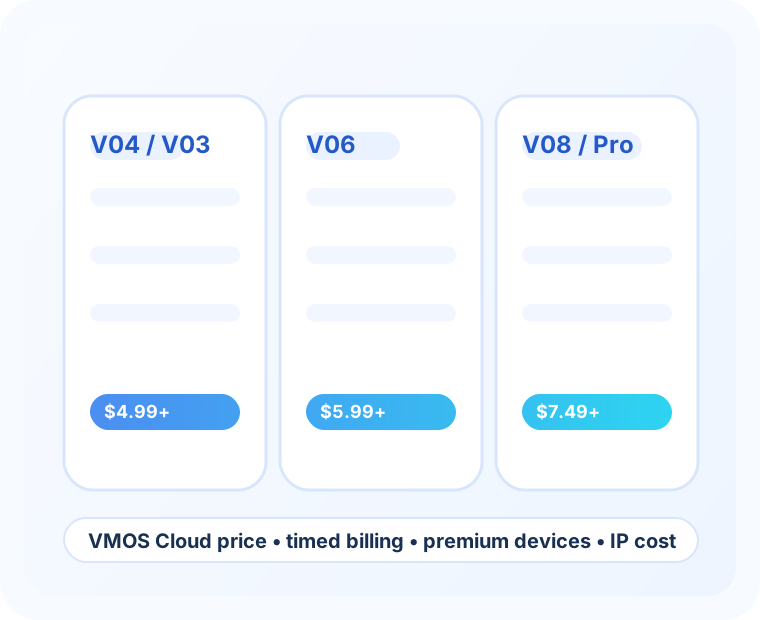
Use the trial result to pick a paid plan quickly. The goal is not to buy the biggest plan first; it is to start with the tier that fits the first month.
Use V04 when the workflow is light, budget matters, and the trial did not show a need for extra headroom.
Start with V04Use V06 when recurring social, app, or remote Android work is likely. Not sure yet? Start here before scaling.
Pick V06Use V08 when multitasking, account volume, or team work makes CPU and RAM headroom worth the higher price.
Choose V08Compare the live checkout price, then use V06 as the balanced default if V04 feels too tight and V08 feels early.
Compare the matrixThe easiest way to improve purchase quality is to make the first payment feel reversible and rational.
If V03 and V04 are close at checkout, V04 is usually the safer low-cost entry because the CPU baseline is stronger.
V08 is a good upgrade when performance affects the result, not a requirement for every first-month buyer.
Premium devices and real-device testing are useful when hardware or validation matters; standard monthly plans are simpler for daily work.
Standard V03 and V04 cloud devices start around $4.99 per 30 days, with Android 14, Android 15, and Android 16 options available.
V06 standard devices start around $5.99 per 30 days, with Android 14, Android 15, and Android 16 options for a stronger balance of price and performance.
V08 standard devices start around $7.49 per 30 days with 8 cores, 8 GB RAM, 16 GB storage, and Android 14 / 15 / 16 options.
Timed V06 cloud devices start around $0.006 per minute, with Android 14 / 15 / 16 available for short sessions instead of a full monthly commitment.
Match the plan to session length, performance needs, and how often the device will stay active after signup.
| Need | Best-fit plan | Billing model | Android version options | Best for | Upgrade trigger |
|---|---|---|---|---|---|
| Lowest monthly entry cost | V03 or V04 | 30-day monthly | Android 14 / 15 / 16 | First-time buyers validating fit, login flow, and basic cloud phone usage. | Move up if the workload becomes daily, heavier, or more account-dense. |
| Balanced recurring cloud phone usage | V06 | 30-day monthly | Android 14 / 15 / 16 | Most routine social media operations and recurring app tasks. | Upgrade if you need more headroom for multitasking or multiple active workflows. |
| Heavier multitasking or higher baseline performance | V08 | 30-day monthly | Android 14 / 15 / 16 | Teams, heavier operators, and users who already know they need more performance margin. | Stay here when standard tiers already cover the workflow and premium hardware is not required. |
| Short-burst sessions instead of always-on usage | Timed V06 | Per-minute | Android 14 / 15 / 16 | Testing short tasks, episodic sessions, or avoiding a full monthly commitment too early. | Switch to monthly if your usage becomes frequent enough that minute billing stops being economical. |
| Premium performance or higher-end device needs | S23 Ultra / S24 Ultra class | Monthly | Android 14 / 15 / 16 | Users who need higher-end device classes or stronger performance from the start. | Only justify the price if higher-end hardware affects real workflow outcomes. |
| Real app verification on physical hardware | Real device testing | Per-minute | Android 14 / 15 / 16 | Compatibility checks and validation scenarios instead of ordinary daily account operations. | Do not use this as a substitute for a normal standard plan if the workflow is ongoing. |
Compare CPU, RAM, storage, Android 14 / 15 / 16 availability, and billing in one place before you choose a monthly cloud phone.
| Plan | Device class | CPU | RAM | Storage | Android version options | Billing mode | Reference price | Best for | Upgrade signal |
|---|---|---|---|---|---|---|---|---|---|
| V08 | Standard cloud device | 8 cores | 8 GB | 16 GB | Android 14 / 15 / 16 | 30-day monthly | $7.49 / 30 days | Heavier daily social workflows, more active multitasking, and users who want more headroom from the start. | Choose this when V06 looks close in price but you know performance margin matters. |
| V06 | Standard cloud device | 6 cores | 6 GB | 16 GB | Android 14 / 15 / 16 | 30-day monthly | $5.99 / 30 days | Balanced recurring cloud phone use and the clearest middle ground for most buyers. | Upgrade to V08 if you expect denser operations or want more CPU and RAM slack. |
| V04 | Standard cloud device | 4 cores | 4 GB | 8 GB | Android 14 / 15 / 16 | 30-day monthly | $4.99 / 30 days | Lower-cost daily entry for lighter workflows and first paid testing cycles. | Move to V06 if the workflow becomes recurring and V04 feels too tight. |
| V03 | Standard cloud device | 3 cores | 4 GB | 8 GB | Android 14 / 15 / 16 | 30-day monthly | $4.99 / 30 days | Basic fit checks and the lightest standard CPU profile in the lineup. | If V03 and V04 checkout at the same price, V04 is usually the safer default. |
If V03 and V04 land close in price at checkout, V04 is usually the easier paid starting point for daily use.
Choose timed billing for short runs, VMOS cloud Pro-style hardware for heavier performance needs, and real-device testing for validation rather than daily operations.
| Category | Example device | Configuration | Android version options | Reference billing | Best for | What to watch |
|---|---|---|---|---|---|---|
| Timed cloud phone | V06 | 6 cores / 6 GB / 16 GB | Android 14 / 15 / 16 | $0.006 / minute | Short sessions, limited tests, and early validation before monthly commitment. | Can become less economical if the device is used frequently across the month. |
| Premium device | S23 Ultra | 12 GB RAM / 85 GB storage | Android 14 / 15 / 16 | $13.99 / month | Higher-end device intent and more demanding performance expectations. | Only worth the jump if premium hardware affects the real workflow. |
| Premium device | S24 Ultra | 12 GB RAM / 85 GB storage | Android 14 / 15 / 16 | $13.99 / month | Users specifically evaluating newer premium Android classes. | Do not treat premium hardware as mandatory if standard tiers already meet the need. |
| Real device testing | Device library | Varies by selected device | Android 14 / 15 / 16 | $0.2 / minute | Compatibility checks, QA, and app validation on physical hardware. | Treat this as a testing budget item, not a like-for-like substitute for monthly cloud phone usage. |
Estimate a stable recurring cost quickly with monthly standard plans, then choose the Android 14, Android 15, or Android 16 setup that fits your apps.
Timed billing fits session-based work and short Android 14 / 15 / 16 validation when a full monthly plan would be overkill.
Higher-end devices should be judged by workload fit, not only by the headline starting price.
For social-media-heavy or account-heavy workflows, the network side can become part of the real operating cost, not just a side note.
| Type | Reference example | How it is billed | Best for | What to budget for |
|---|---|---|---|---|
| Dynamic IP traffic | 2 GB package from $6 | Traffic package | Smaller tests and lower-volume usage. | Traffic can be consumed faster than expected in active workflows. |
| Dynamic IP traffic | 100 GB package from $216 | Traffic package | Larger workflows that want a traffic-based model instead of per-IP planning. | Useful when you know usage volume, not when you only compare entry pricing. |
| Static IP | US zone from $2.29 / IP / month | Per IP, per month | Workflows that care about steadier network identity. | Real cost scales with number of IPs, not just number of devices. |
| Static IP | Selected regions priced higher | Varies by zone | Geo-specific operations with location-sensitive requirements. | Region choice can materially change the total operating budget. |
Start with V04 or V06 if you want the clearest balance of cost and everyday usability before moving into premium tiers.
Android 14, Android 15, and Android 16 are supported across VMOS Cloud plans, with final version options shown by the selected plan and device at checkout.
V03 and V04 can appear very close in reference price, but V04 has a stronger CPU baseline. If the live checkout price is similar, V04 is usually the safer default for first paid usage.
Choose V06 when the workflow is no longer just a light test. It is the more practical middle tier for recurring social media tasks, denser app activity, and buyers who already expect regular use.
V08 becomes easier to justify when you want more CPU and RAM headroom from day one, or when the cost gap is small compared with the performance margin you need for heavier multitasking.
Timed billing is usually better for short, intermittent sessions. If the device runs often across the month, a monthly plan is usually more predictable and easier to budget.
Premium tiers make more sense when you need higher-end hardware or a more demanding workload than the standard lineup is built for.
Premium devices are still part of an ongoing device-usage decision, while real device testing is closer to a validation or QA budget. One supports regular operations; the other supports short test scenarios.
No. If your workflow depends on networking, account operations, or traffic usage, you should also factor in IP and traffic pricing rather than looking only at the device rental cost.
No. Start with device-level testing first, then add traffic packages or static IPs when the workflow and account strategy are clearer.
Yes. The 2-hour free trial is enough to validate access, setup, app install, and basic workflow fit before moving into a larger monthly or premium plan.
Use the 2-hour free trial to test VMOS cloud login, app install, initial device responsiveness, and first workflow validation before you upgrade.
Use the 2-hour free trial to confirm login, app access, and workload fit, then upgrade to the monthly, timed, or premium plan that actually matches the job.
Visitors from ChatGPT, Perplexity, and other AI search tools often need direct answers before they click a signup link. These answers summarize the buying path without forcing a long page scan.
Yes. The 2-hour VMOS Cloud free trial is the fastest way to test login, launch a cloud phone, install a target app, and check whether the workflow is worth paying for.
Start with V04 or V06 if the trial proves a light or routine workflow. Compare V08, timed billing, premium devices, and IP costs only when performance, session length, or network requirements make them necessary.
It can be useful when you need repeated cloud Android access, account separation, app testing, or team-based workflows instead of relying on one local phone or local emulator.
Confirm the login path, target app compatibility, Android version, device speed, billing model, and any IP or traffic cost before moving from the free trial to a paid plan.
A low purchase rate after registration usually means the trial did not answer the buyer's main question: which paid VMOS Cloud plan is safe to start with. Use the free trial as a short decision checklist, not just a quick look around.
Register, open one cloud phone, and make sure login, launch speed, and basic navigation feel stable before considering a paid plan.
Use the trial to test your main app on the Android version you plan to buy, especially if you care about Android 14, Android 15, or Android 16.
If the workflow is light, start with V04 or V06. If multitasking, speed, or account volume matters, compare V08, premium devices, timed billing, and IP costs.
| Trial result | Best next step | Buying signal |
|---|---|---|
| Login, app install, and basic workflow pass | Start with V04 or V06 | Good first paid plan for lighter daily work |
| Workflow passes but feels performance-limited | Compare V06 and V08 | More CPU/RAM headroom may be worth the small price gap |
| Short sessions only | Check timed billing | Per-minute use may be safer than a full month |
| Network identity or account separation matters | Review IP and traffic cost | Budget device price and IP cost together before paying |
If someone tries the trial and still feels unsure, they usually need a simpler way to judge the first paid plan.
Open the invite link, create the account, and try one cloud phone session with the app you actually care about.
Install the app, check login, look at speed, and see whether the device still feels comfortable after a few minutes.
Choose V06 as the balanced default, V04 when budget matters most, and V08 or premium only when the extra power clearly matters.